Two ways to export
You can export from either the mobile app or the website — both produce the same CSV.
From the app
- 1.Open Shellf and go to Settings → Export your Library.
- 2.Tap Export as CSV. The file saves to your device.
From the web
- 1.Visit shellf.app/export-my-library and sign in.
- 2.Click Download my library. The CSV downloads to your device.
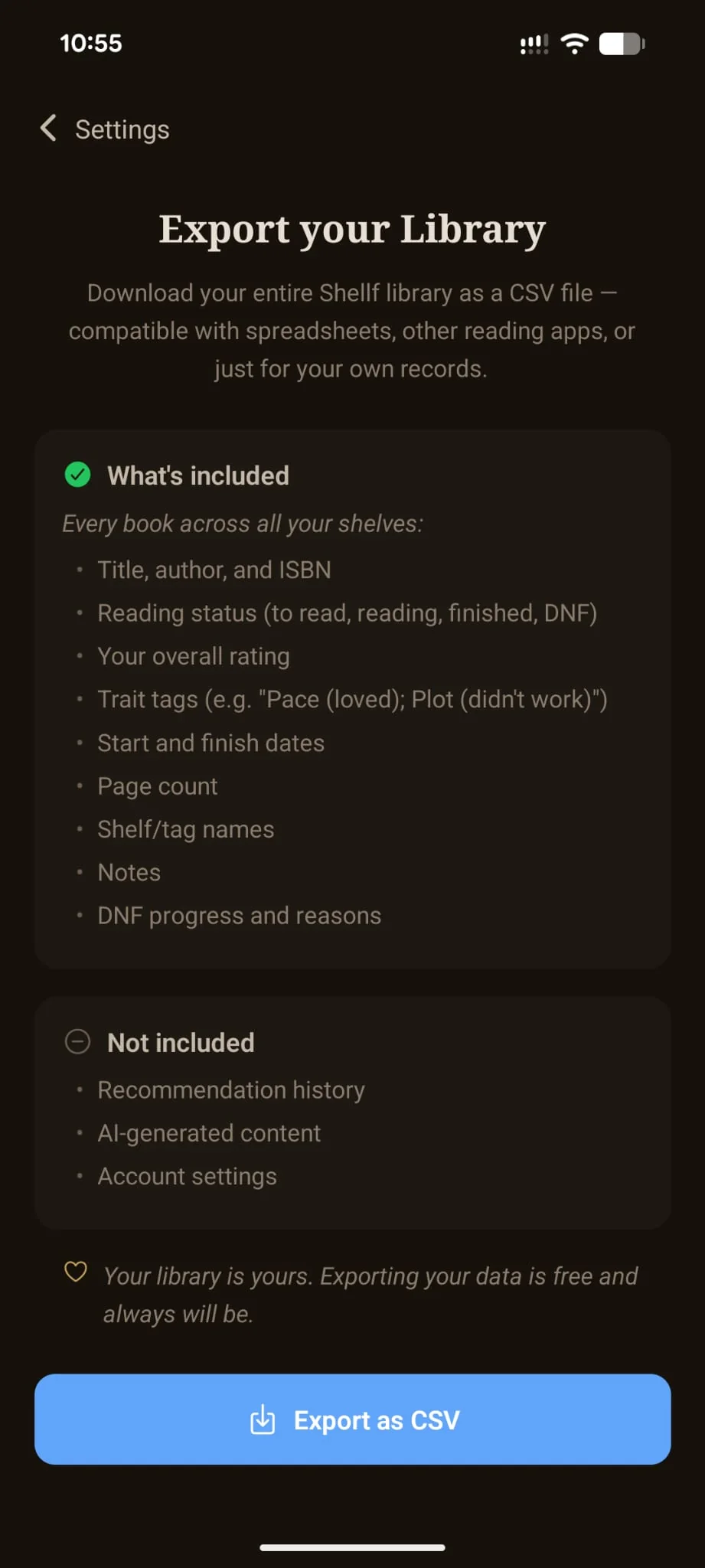
What’s in the CSV
Every book on every shelf, with the fields below.
- •Title and author
- •ISBN-10 and ISBN-13 (whichever the catalogue has)
- •Reading status: to-read, currently reading, finished, or DNF
- •Overall star rating (half-star precision preserved)
- •Per-trait rating tags — e.g.
Pace (loved); Plot (didn’t work) - •Start date and finish date
- •Page count
- •Custom shelves and tags
- •Notes (your private text)
- •DNF progress and reasons
The CSV is compatible with the standard Goodreads / StoryGraph format for the universal columns. The trait-tag column is a Shellf addition; other trackers will ignore it on import, but the rest of the data lands cleanly.
What’s not included
- •Recommendation history. The list of books the engine has surfaced to you isn’t part of the export.
- •AI-generated content. The taste profile, archetype summaries, and reasoning text the engine builds from your library are derived data — recomputed from your ratings. Your ratings, which generate them, are fully exported.
- •Account settings. Email, subscription state, notification preferences. None of that is your reading data, so it stays out of the file.
Why portability is non-negotiable
Shellf is small. If I get hit by a bus, you should be able to walk away with your library intact and import it into Goodreads, StoryGraph, Hardcover, or whatever else exists. The CSV is compatible with the standard Goodreads / StoryGraph format, so re-importing into either is one step.
The principle: your reading data is yours. Leaving should be as frictionless as joining. Locking export behind a paid tier or making you wait 30 days is the kind of thing apps do when they’re afraid of churn — it doesn’t actually prevent churn, it just makes the churning user angry.
Ready to try it? Install Shellf on Android. iOS launches mid-2026.
Related questions
- →How do I import my library from Goodreads?
- →Is Shellf free?
- →How much does Shellf cost?
- →Does Shellf work on iPhone?
- →Does Shellf work on Android?